



复习
- 服务发现,获取到提供方的服务地址
(1)nacos
(2)原理
- 服务注册:提供方,启动时向服务注册表注册自己的实例信息
- 拉取列表:调用方,从服务注册表获取服务列表
- 健康监测:服务注册表监测服务提供方的健康状态
- 变更通知:注册表通知调用方,服务实例变化,重新拉取服务列表
- 负载均衡,调用流量均衡化的问题,客户端式的负载均衡,默认策略轮询
(1)经典负载均衡策略
- 轮询
- 加权轮询
- 随机
- 来源IP 哈希 -> 粘性会话
- ...
-
服务调用 openfeign 声明式服务调用客户端
(1)feignClient定义在调用方(2)feignClient定义了要调用的接口(包含入参和出参)
(3)@FeignClient注解的参数
- name 服务名
- contextId spring bean的id,区分同一个服务的不同客户端
- path api的针对整个client的路径,对应到提供方的RestController的@RequestMapping
(4)@EnableFeignClients
(5)Feign实现原理
- 动态代理+反射
- 动态代理,动态创建一个实现类,实现了接口
- 通过反射获取到一些接口的配置数据
- 实现类的方法中,使用这些数据,实现服务发现+负载均衡+远程调用功能
- feign组件:requestBean → contract → MethodHandler → Encoder → Interceptor → logger → Http Client
分布式事务
问题:服务拆分,每个服务有自己独立的数据库
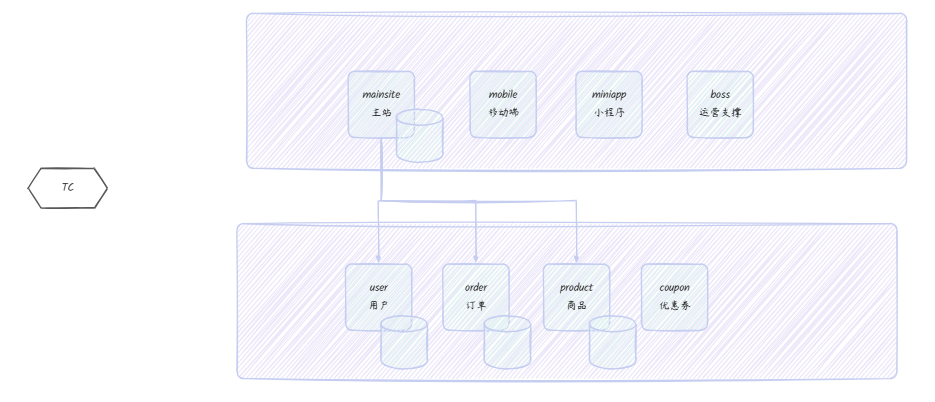
概念
-
分布式事务 (全局事务) vs 本地事务(分支事务)
-
分布式事务的参与角色
- TC 事务协调者,管理全局事务
- TM 事务发起者,发起全局事务
- RM 事务参与者,参与全局事务
-
两阶段提交 2pc
- 一阶段,准备阶段,TC通知所有RM准备提交
- 二阶段,提交阶段
-
TC统计准备结果,如果全部准备成功,则通知所有RM提交
-
如果存在失败,则通知所有RM回滚
解决方案
-
XA协议
- 第一阶段:准备阶段(Prepare Phase)
- TM向所有参与的RM发送
prepare请求。 - 各RM执行本地事务,记录
undo和redo日志,但不提交,资源被锁定。 - 各RM向TM返回“成功”或“失败”的投票结果。
- 第二阶段:提交/回滚阶段(Commit/Rollback Phase)
- 如果TM收到所有RM的“成功”回复,则向所有RM发送
commit请求,完成提交并释放锁。 - 如果任一RM回复“失败”或超时,TM则向所有RM发送
rollback请求,利用undo日志回滚并释放锁。 - 问题:
- 事务挂起,资源空耗
- 性能低
- 重试+幂等
- A -> B A成功后,如果B失败,则重试,直到B成功(人工介入)
- 幂等性判断,通过订单号实现,redis/mysql存储订单号,进行订单号判断
- 优点:实现成本低;
- 缺点:性能消耗;不够自动;
-
TCC: Try-Confirm-Cancel 尝试-确认-取消
- 将一个业务接口拆分成三个部分来执行,分别对应TCC
- 一阶段: TC调用服务的Try接口,预备执行业务所需要的资源,确保执行成功。 举例:账务转账-try,冻结资金
-
update balance set available_balance-额度 , frozen_balance+额度;
-
insert into freeze_log(xxx);
-
commit;
-
二阶段:
-
如果所有的RM,try操作都执行成功,TC调用所有服务的confirm接口。举例:账务转账-confirm
- update balance set frozen_balance-额度 where user_id=转出方。
- update balance set avaliable_balance +额度 where user_id=转入方。
- insert into freeze_log(xxx) 解冻记录
- insert into transfer_record(xxxx) 转账记录
- commit;
-
如果存在Try失败的情况,TC调用所有服务的Cancel接口。举例:账务转账-cancel
- update balance set available_balance+额度 , frozen_balance-额度;
- insert into freeze_log(xxx);
- commit;
-
优点:
- 没有资源空耗,性能较高
- 实现逆向补偿,完成分布式事务的回滚
- 没有引入额外的技术
- 基本逻辑是由人为编码完成,灵活性高
-
缺点
- 一拆三,需要加入更多的代码,工作量大
- 需要进行业务重构,重新设计,加入中间环节
-
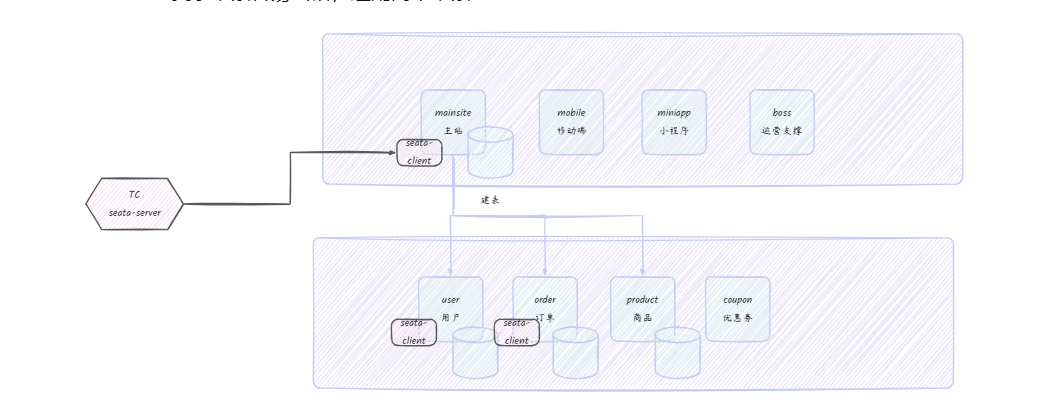
AT模式
- 每个数据库需要加入一张undo_log表
- 一阶段:seata代理数据源,拦截sql执行,执行业务,获取sql执行前后的数据镜像,转换为sql插入到undo_log表,加入当前事务执行
- 二阶段:
-
提交:删除undo_log记录
-
回滚:提取undo_log表中前后数据镜像,计算得出逆向补偿sql,执行sql进行补偿
-
优点:
-
没有资源空耗,性能较高
-
实现逆向补偿,完成分布式事务的回滚
-
无须编码,代码量极低
-
缺点
-
每个数据库要建表
-
复杂场景容易出错,适配简单场景
-
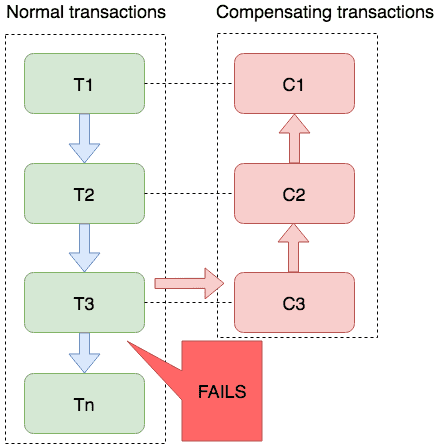
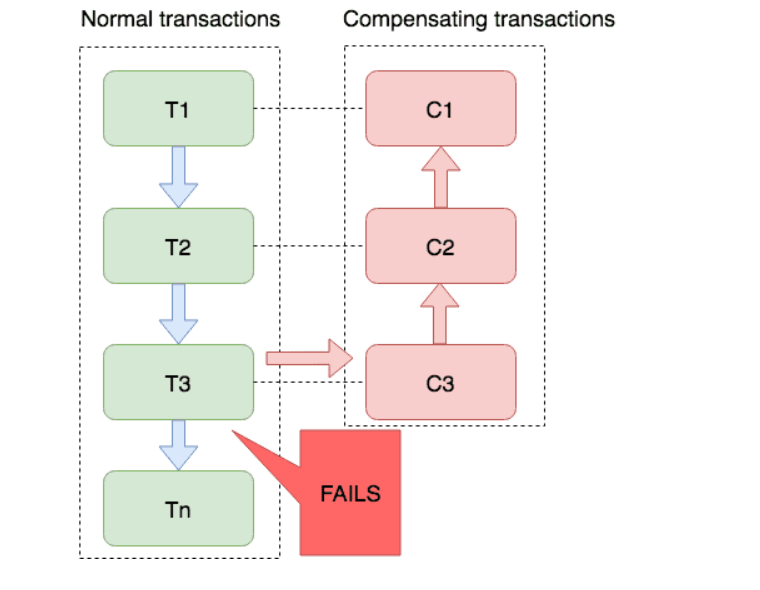
saga
Saga 模式是 SEATA 提供的长事务解决方案,在 Saga 模式中,业务流程中每个参与者都提交本地事务,当出现某一个参与者失败则补偿前面已经成功的参与者,一阶段正向服务和二阶段补偿服务都由业务开发实现。
AT案例
-
搭建seata-server
- 下载
- 解压
- 修改配置
-
修改内存
-
修改application.yml
seata:
  config:
    # support: nacos, consul, apollo, zk, etcd3
    type: nacos
    nacos:
      server-addr: 127.0.0.1:8848
      namespace:
      group: DEFAULT_GROUP
      username: nacos
      password: nacos
      context-path:
      ##if use MSE Nacos with auth, mutex with username/password attribute
      #access-key:
      #secret-key:
      data-id: seataServer.properties
  registry:
    # support: nacos, eureka, redis, zk, consul, etcd3, sofa
    type: nacos
    nacos:
      application: seata-server
      server-addr: 127.0.0.1:8848
      group: DEFAULT_GROUP
      namespace:
      cluster: default
      username: nacos
      password: nacos
      context-path:
      ##if use MSE Nacos with auth, mutex with username/password attribute
      #access-key:
      #secret-key:
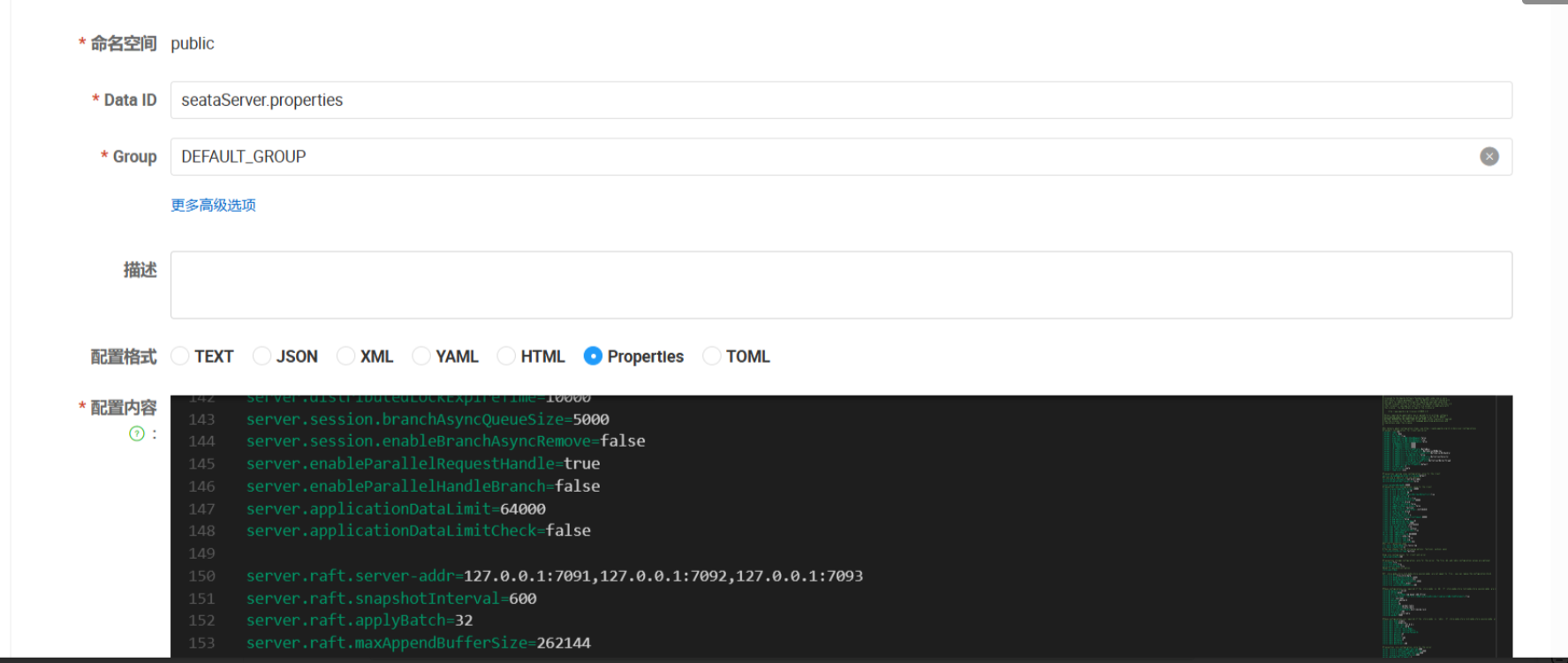
在nacos配置seata属性
#
# Licensed to the Apache Software Foundation (ASF) under one or more
# contributor license agreements.  See the NOTICE file distributed with
# this work for additional information regarding copyright ownership.
# The ASF licenses this file to You under the Apache License, Version 2.0
# (the "License"); you may not use this file except in compliance with
# the License.  You may obtain a copy of the License at
#
#     http://www.apache.org/licenses/LICENSE-2.0
#
# Unless required by applicable law or agreed to in writing, software
# distributed under the License is distributed on an "AS IS" BASIS,
# WITHOUT WARRANTIES OR CONDITIONS OF ANY KIND, either express or implied.
# See the License for the specific language governing permissions and
# limitations under the License.
#

#For details about configuration items, see https://seata.apache.org/zh-cn/docs/user/configurations
#Transport configuration, for client and server
transport.type=TCP
transport.server=NIO
transport.heartbeat=true
transport.enableTmClientBatchSendRequest=false
transport.enableRmClientBatchSendRequest=true
transport.enableTcServerBatchSendResponse=false
transport.rpcRmRequestTimeout=30000
transport.rpcTmRequestTimeout=30000
transport.rpcTcRequestTimeout=30000
transport.threadFactory.bossThreadPrefix=NettyBoss
transport.threadFactory.workerThreadPrefix=NettyServerNIOWorker
transport.threadFactory.serverExecutorThreadPrefix=NettyServerBizHandler
transport.threadFactory.shareBossWorker=false
transport.threadFactory.clientSelectorThreadPrefix=NettyClientSelector
transport.threadFactory.clientSelectorThreadSize=1
transport.threadFactory.clientWorkerThreadPrefix=NettyClientWorkerThread
transport.threadFactory.bossThreadSize=1
transport.threadFactory.workerThreadSize=default
transport.shutdown.wait=3
transport.serialization=seata
transport.compressor=none

#Transaction routing rules configuration, only for the client
service.vgroupMapping.default_tx_group=default
#If you use a registry, you can ignore it
service.default.grouplist=127.0.0.1:8091
service.disableGlobalTransaction=false

client.metadataMaxAgeMs=30000
#Transaction rule configuration, only for the client
client.rm.asyncCommitBufferLimit=10000
client.rm.lock.retryInterval=10
client.rm.lock.retryTimes=30
client.rm.lock.retryPolicyBranchRollbackOnConflict=true
client.rm.reportRetryCount=5
client.rm.tableMetaCheckEnable=true
client.rm.tableMetaCheckerInterval=60000
client.rm.sqlParserType=druid
client.rm.reportSuccessEnable=false
client.rm.sagaBranchRegisterEnable=false
client.rm.sagaJsonParser=fastjson
client.rm.tccActionInterceptorOrder=-2147482648
client.rm.sqlParserType=druid
client.tm.commitRetryCount=5
client.tm.rollbackRetryCount=5
client.tm.defaultGlobalTransactionTimeout=60000
client.tm.degradeCheck=false
client.tm.degradeCheckAllowTimes=10
client.tm.degradeCheckPeriod=2000
client.tm.interceptorOrder=-2147482648
client.undo.dataValidation=true
client.undo.logSerialization=jackson
client.undo.onlyCareUpdateColumns=true
server.undo.logSaveDays=7
server.undo.logDeletePeriod=86400000
client.undo.logTable=undo_log
client.undo.compress.enable=true
client.undo.compress.type=zip
client.undo.compress.threshold=64k
#For TCC transaction mode
tcc.fence.logTableName=tcc_fence_log
tcc.fence.cleanPeriod=1h
# You can choose from the following options: fastjson, jackson, gson
tcc.contextJsonParserType=fastjson

#Log rule configuration, for client and server
log.exceptionRate=100

#Transaction storage configuration, only for the server. The file, db, and redis configuration values are optional.
store.mode=file
store.lock.mode=file
store.session.mode=file
#Used for password encryption
store.publicKey=

#If `store.mode,store.lock.mode,store.session.mode` are not equal to `file`, you can remove the configuration block.
store.file.dir=file_store/data
store.file.maxBranchSessionSize=16384
store.file.maxGlobalSessionSize=512
store.file.fileWriteBufferCacheSize=16384
store.file.flushDiskMode=async
store.file.sessionReloadReadSize=100

#These configurations are required if the `store mode` is `db`. If `store.mode,store.lock.mode,store.session.mode` are not equal to `db`, you can remove the configuration block.
store.db.datasource=druid
store.db.dbType=mysql
store.db.driverClassName=com.mysql.jdbc.Driver
store.db.url=jdbc:mysql://127.0.0.1:3306/seata?useUnicode=true&rewriteBatchedStatements=true
store.db.user=username
store.db.password=password
store.db.minConn=5
store.db.maxConn=30
store.db.globalTable=global_table
store.db.branchTable=branch_table
store.db.distributedLockTable=distributed_lock
store.db.queryLimit=100
store.db.lockTable=lock_table
store.db.maxWait=5000

#These configurations are required if the `store mode` is `redis`. If `store.mode,store.lock.mode,store.session.mode` are not equal to `redis`, you can remove the configuration block.
store.redis.mode=single
store.redis.type=pipeline
store.redis.single.host=127.0.0.1
store.redis.single.port=6379
store.redis.sentinel.masterName=
store.redis.sentinel.sentinelHosts=
store.redis.sentinel.sentinelPassword=
store.redis.maxConn=10
store.redis.minConn=1
store.redis.maxTotal=100
store.redis.database=0
store.redis.password=
store.redis.queryLimit=100

#Transaction rule configuration, only for the server
server.recovery.committingRetryPeriod=1000
server.recovery.asynCommittingRetryPeriod=1000
server.recovery.rollbackingRetryPeriod=1000
server.recovery.timeoutRetryPeriod=1000
server.maxCommitRetryTimeout=-1
server.maxRollbackRetryTimeout=-1
server.rollbackRetryTimeoutUnlockEnable=false
server.distributedLockExpireTime=10000
server.session.branchAsyncQueueSize=5000
server.session.enableBranchAsyncRemove=false
server.enableParallelRequestHandle=true
server.enableParallelHandleBranch=false
server.applicationDataLimit=64000
server.applicationDataLimitCheck=false

server.raft.server-addr=127.0.0.1:7091,127.0.0.1:7092,127.0.0.1:7093
server.raft.snapshotInterval=600
server.raft.applyBatch=32
server.raft.maxAppendBufferSize=262144
server.raft.maxReplicatorInflightMsgs=256
server.raft.disruptorBufferSize=16384
server.raft.electionTimeoutMs=2000
server.raft.reporterEnabled=false
server.raft.reporterInitialDelay=60
server.raft.serialization=jackson
server.raft.compressor=none
server.raft.sync=true


#Metrics configuration, only for the server
metrics.enabled=false
metrics.registryType=compact
metrics.exporterList=prometheus
metrics.exporterPrometheusPort=9898

service.vgroupMapping.default-tx-group=default
启动
-
添加seata-client
-
建表
CREATE TABLE IF NOT EXISTS `undo_log`
(
  `branch_id`     BIGINT       NOT NULL COMMENT 'branch transaction id',
  `xid`           VARCHAR(128) NOT NULL COMMENT 'global transaction id',
  `context`       VARCHAR(128) NOT NULL COMMENT 'undo_log context,such as serialization',
  `rollback_info` LONGBLOB     NOT NULL COMMENT 'rollback info',
  `log_status`    INT(11)      NOT NULL COMMENT '0:normal status,1:defense status',
  `log_created`   DATETIME(6)  NOT NULL COMMENT 'create datetime',
  `log_modified`  DATETIME(6)  NOT NULL COMMENT 'modify datetime',
  UNIQUE KEY `ux_undo_log` (`xid`, `branch_id`)
) ENGINE = InnoDB AUTO_INCREMENT = 1 DEFAULT CHARSET = utf8mb4 COMMENT ='AT transaction mode undo table';
ALTER TABLE `undo_log` ADD INDEX `ix_log_created` (`log_created`);
-
-
加依赖
<!-- 加入seata --> <dependency> <groupId>com.alibaba.cloud</groupId> <artifactId>spring-cloud-starter-alibaba-seata</artifactId> </dependency> -
修改配置
seata: enabled: true application-id: ${spring.application.name} tx-service-group: default-tx-group config: type: nacos nacos: serverAddr: 127.0.0.1:8848 dataId: "seataServer.properties" group: "DEFAULT_GROUP" username: 'nacos' password: 'nacos' registry: type: nacos nacos: application: seata-server server-addr: 127.0.0.1:8848 group: "DEFAULT_GROUP" username: 'nacos' password: 'nacos' -
加注解 @GlobalTransactional
-
抛异常,测试回滚
seata-at模式的执行流程
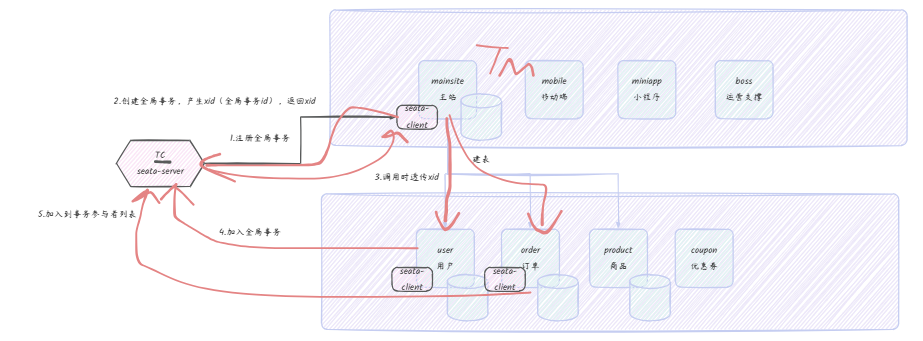
- 请求到达TM,TM检查是否存在xid,若无,则向TC注册全局事务
- TC接收到请求,开启事务,返回xid
- TM将xid透传给后续的服务(RM)
- 后续服务,检查是否有xid,存在,则向TC申请加入全局事务
- TC维护全局事务的参与者列表
- TC协调所有参与者提交或回滚
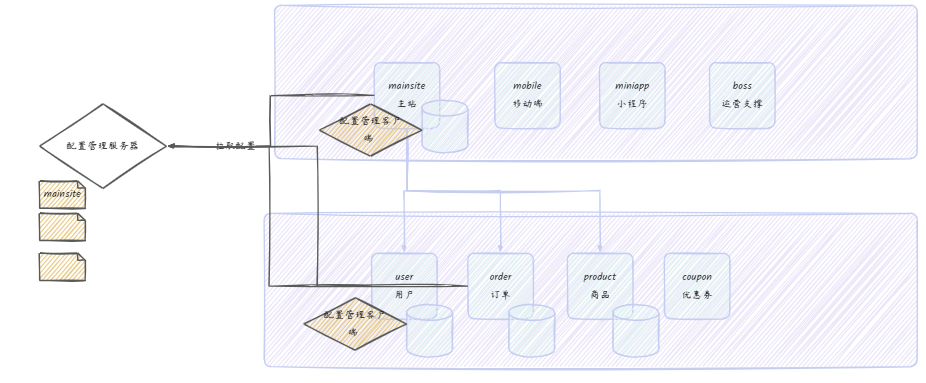
配置管理
需求:统一配置管理平台
-
配置审计
-
公用配置
-
配置刷新
基本示例
-
加依赖
<dependency>
  <groupId>com.alibaba.cloud</groupId>
  <artifactId>spring-cloud-starter-alibaba-nacos-config</artifactId>
</dependency>
-
-
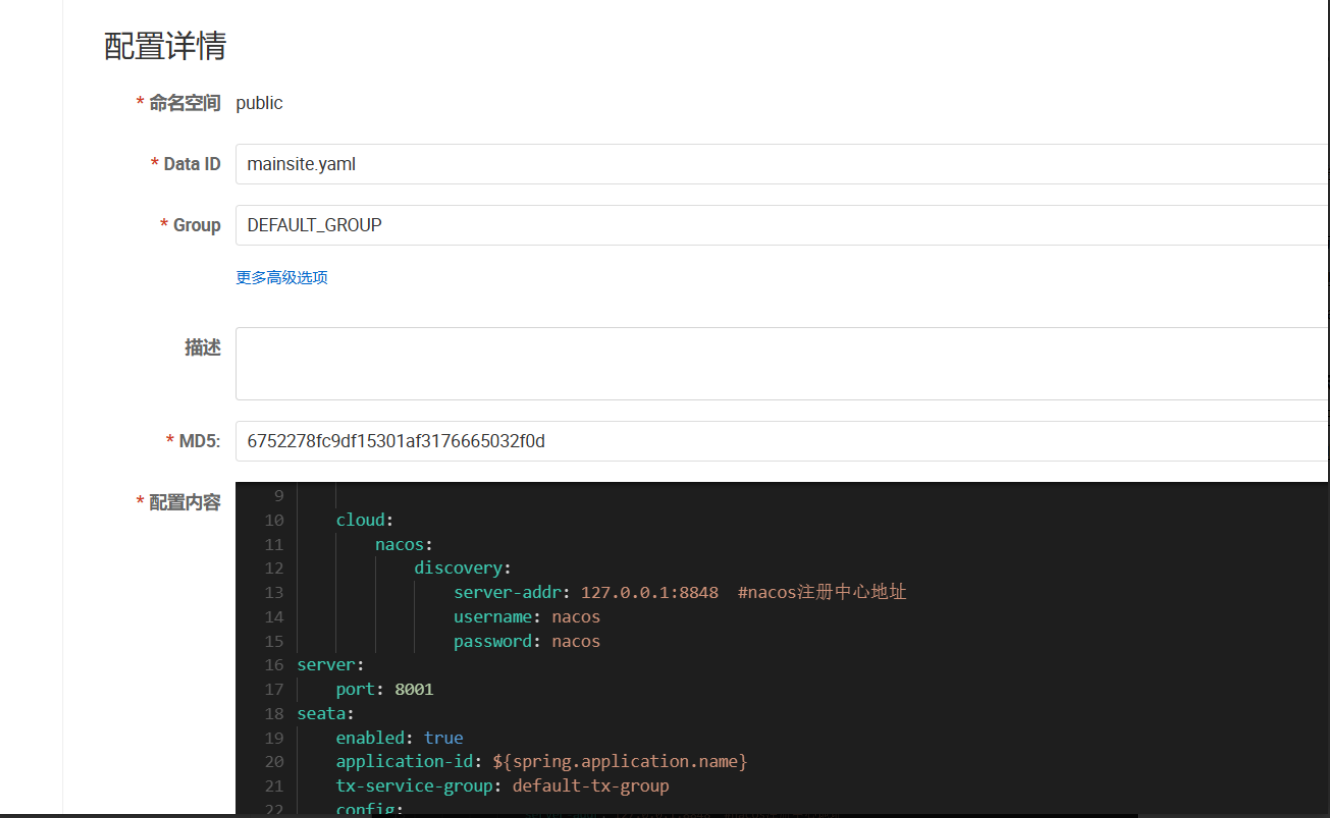
新增配置(nacos)
-
应用配置移到nacos,保留spring.application.name
-
添加必要的配置
spring:
    application:
        name: mainsite  #服务名
    cloud:
        nacos:
            config:
                server-addr: 127.0.0.1:8848
                file-extension: yaml
    config:
        import:
            # 使用 optional 前缀可以让服务在 Nacos 配置不存在时也能启动
            # 这里导入了服务自身的配置,格式为:应用名-环境.文件扩展名
            - optional:nacos:${spring.application.name}.${spring.cloud.nacos.config.file-extension}
-
-
重启
公共配置
spring:
    application:
        name: mainsite  #服务名
    cloud:
        nacos:
            config:
                server-addr: 127.0.0.1:8848
                file-extension: yaml
    config:
        import:
            # 使用 optional 前缀可以让服务在 Nacos 配置不存在时也能启动
            # 这里导入了服务自身的配置,格式为:应用名-环境.文件扩展名
            - optional:nacos:${spring.application.name}.${spring.cloud.nacos.config.file-extension}
            - optional:nacos:common.${spring.cloud.nacos.config.file-extension}
spring:
  datasource:
    driver-class-name: com.mysql.cj.jdbc.Driver
  cloud:
    nacos:
      discovery:
        server-addr: localhost:8848
  mvc:
    format:
      date-time: yyyy-MM-dd HH:mm:ss
  jackson:
    date-format: yyyy-MM-dd HH:mm:ss

mybatis-plus:
  mapper-locations: classpath*:mappers/**/*.xml
  configuration:
    map-underscore-to-camel-case: true
    log-impl: org.apache.ibatis.logging.slf4j.Slf4jImpl
seata:
  enabled: true
  application-id: ${spring.application.name}
  tx-service-group: default-tx-group
  config:
    type: nacos
    nacos:
      serverAddr: 127.0.0.1:8848
      dataId: "seataServer.properties"
      group: "DEFAULT_GROUP"
      username: 'nacos'
      password: 'nacos'
  registry:
    type: nacos
    nacos:
      application: seata-server
      server-addr: 127.0.0.1:8848
      group: "DEFAULT_GROUP"
      username: 'nacos'
      password: 'nacos'
logging:
  level:
    com.woniuxy: debug
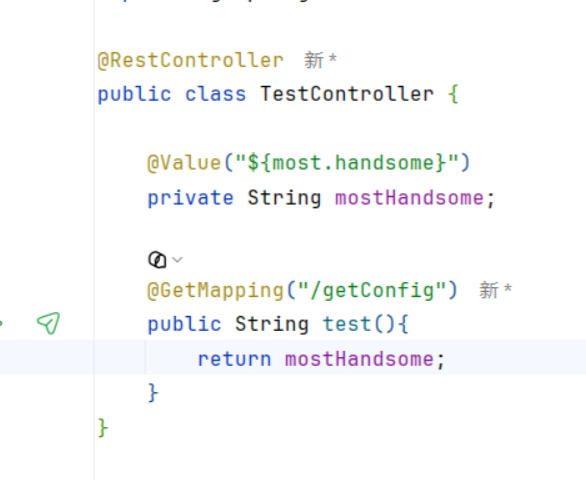
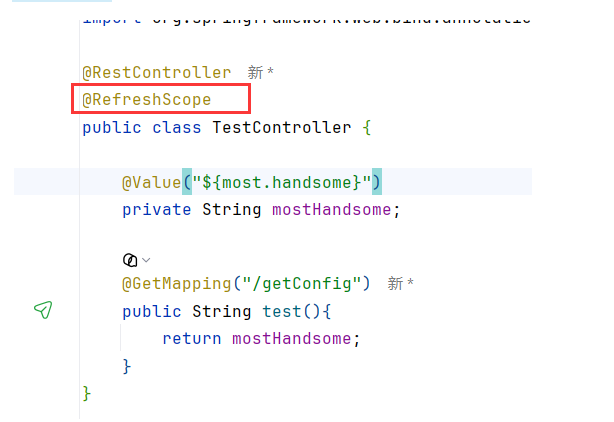
配置刷新
评论